

TerraScan User Guide
Write group parameters
Computes and exports group parameters for each group to a text file. Points must have assigned groups using Grouping Routines. The output is a table with groups as rows and parameters as columns, defined in File formats / User group parameter formats category of the TerraScan Settings.
How to write group parameters to a file:
1.Select Write group parameters from TerraScan Main Window Group pulldown menu. This opens the Write Group Parameters dialog:
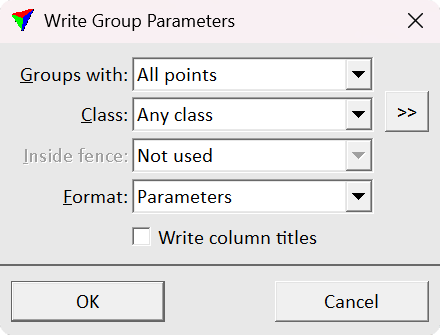
2.Define the settings and click OK. This opens the Group output file dialog, a standard dialog for saving files.
3.Define a storage directory and a name for the output file and slick Save. This creates the output text file.
EFFECT |
|
|---|---|
Groups with |
Determines which groups are considered: •One or more points - groups with one or more points in the source class. •Majority of points - groups with the majority of points in the source class. •All points - groups with all points in the source class. |
Class |
Point class(es) that are included in the output. |
|
Opens the Select classes dialog which contains the list of active classes in TerraScan. You can select multiple source classes from the list that are then used in the Class field. |
Inside fence |
Defines how a fence influences the selection of groups. The output includes only the selected groups. •Not used - fence or selected polygons are ignored. All groups from loaded points are selected. •One or more points - groups are selected if one or more points are inside. •Average xy - groups are selected if the average xy point is inside. •Majority of points - groups are selected if the majority of points are inside. •All points - groups are selected if all points are inside. |
Format |
Defines the columns and their order in the output file. The list contains all formats defined in File formats / User group parameter formats. |
Write column titles |
If on, header row with column titles is written to the output file. |
