

TerraScan User Guide
Renumber Groups
Renumber groups command reassigns group identifier numbers for point cloud. It is useful for fixing overlapping group identifiers in case combining separately processed data samples. Another use example is applying continuous enumeration as group identifier for specific class(es) for better reporting.
To renumber groups:
1. Select Renumber groups command from the Group pulldown menu.
This opens the Renumber Groups dialog:
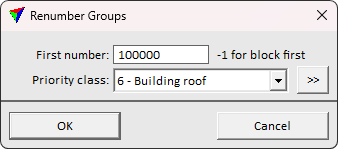
2. Define settings and click OK.
This assigns a new group number for each point group.
SETTING |
EFFECT |
|---|---|
First number |
The smallest id number to use in enumeration. If working on a project block, parameter value -1 starts numbering from the first id reserved for the active block in the project file. |
Priority class |
Point class(es) that are split from groups containing points of several classes and become an own group. |
|
Opens the Select classes dialog which contains the list of active classes in TerraScan. You can select multiple source classes from the list that are then used in the Priority class field. |
