

TerraScan User Guide
Merge splats
Merge splats loads gaussian splat parameters from separate gaussian splat files to active point cloud. The application pairs points and splats by position, meaning the active points and splats must share the same coordinate system.
The copied gaussian splat parameters can be used for highly photo realistic visualization, while maintaining the high geometric accuracy of the original point cloud data. Gaussian splat visualization can be rendered with TerraSplat or TerraStereo applications.
The process copies the additional parameters for each point that can be paired with a splat. The result can be stored in point cloud formats capable storing extra attributes.
To load gaussian splat parameters to active point cloud:
1. Select Merge splats command from the File pulldown menu.
This opens the standard file selection dialog. Select the input gaussian splat files and accept selection.
This opens the Merge Splats dialog:
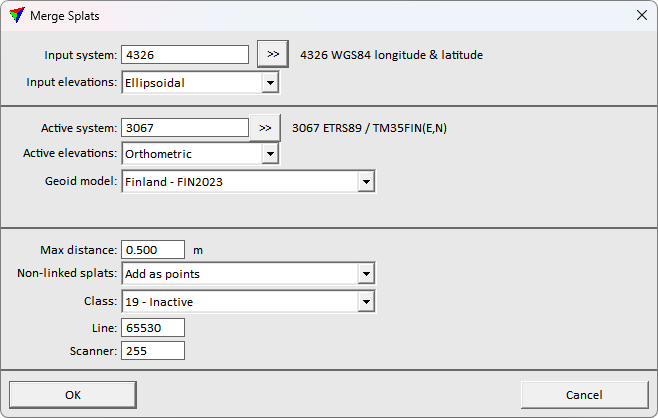
2. Define settings and click OK.
This loads the gaussian splat file(s), copies the gaussian splat parameters to the active points and closes the gaussian splat files.
The resulting fusion can be stored in point cloud formats supporting extra attributes. The data can be visualized activating TerraSplat or TerraStereo, and selecting Splat display mode option.
SETTING |
EFFECT |
|---|---|
Input system |
Projection system of the input splat data. Click on the >> Button to open the Browse for Projection System dialog. The dialog provides a search option for projection systems as well as a list of all implemented systems. In addition, any user-defined projection systems are included in the list. |
Input elevations |
Elevation values of the input splat data: Ellipsoidal or Orthometric. Data collect with measurement systems is usually provided with ellipsoidal height values. |
Active system |
Projection system of the data for processing. Click on the >> Button to open the Browse for Projection System dialog. The dialog provides a search option for projection systems as well as a list of all implemented systems. In addition, any user-defined projection systems are included in the list. |
Active elevations |
Elevation values of the data for processing: Ellipsoidal or Orthometric. Data for delivery is usually provided with orthometric values of some local height model. |
Geoid model |
Model that provides the geoid correction. Transforms the elevation values of the input data from input to target elevation values. This is active only if any Input elevations setting differs from the Target elevations setting. |
Max distance |
Maximum distance for pairing points and splats. |
Non-linked splats |
Whether to Ignore or Add as points the splats that the software could not pair with any point. Good quality gaussian splat visualization usually requires splats distant from the true geometry, and it is recommended to create additional points from the separated splats. |
Class |
Class to use for the non-linked splats. This is available only if Non-linked splats is set to Add as points. |
Line |
Line number to use for non-linked splats. This is available only if Non-linked splats is set to Add as points. |
Scanner |
Scanner number to use for non-linked splats. This is available only if Non-linked splats is set to Add as points. |