

TerraScan User Guide
Extra attributes
Extra attributes category shows a list of additional point attribute definitions. Extra attributes store some data for each point in the collected sample. Extra attributes can be used to support and enhance the processing tasks.
You can Add, Edit, and Delete extra attribute definitions by using the corresponding buttons in the Settings dialog.
You can Save or Open file containing the extra attribute definitions. This allows storing different definitions for different projects, and changing the active set of definitions efficiently.
Additionally, you can load the extra attribute definitions from a sample point cloud file using Add from file button. This opens the standard file selection dialog for picking the sample file containing the desired set of extra attributes.
To add a new extra attribute definition:
1. Open the Extra attributes category.
2. Click Add in the Settings dialog.
The Extra attribute dialog opens:
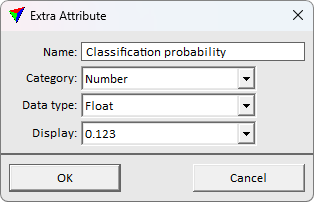
3. Define settings and click OK.
4. Use buttons Save or Save as to store the definition.
SETTING |
EFFECT |
|---|---|
Name |
Name of the extra attribute. |
Category |
Extra attribute type. Different types have different Display mode options and enable use with different processing tools. •Number - generic number attribute. •List value - generic attribute for categorization. •Class - a secondary TerraScan classification attribute. This category extra attributes can be used as alternative classification labels in TerraScan routines requiring class input or storing class information. Fixes the data type to Unsigned byte. •Distance - a secondary TerraScan distance attribute. This category extra attributes can be used as alternative distance values in TerraScan routines requiring distance input or storing distance information. Fixes the data type to Signed 32 bit integer. •Reliability - a secondary TerraScan reliability attribute. This category extra attributes can be used as alternative reliability values in TerraScan routines requiring reliability input or storing reliability information. Fixes the data type to Unsigned byte. |
Data type |
Extra attribute data storage type. Select according to the value range and precision needed for storing the attribute values. •Unsigned byte - integer value from 0 to 255. This format extra attributes can be used as Class or Reliability in actions supporting the use of extra attribute information. •Signed byte - integer value from -128 to 127. •Unsigned 16 bit integer - integer value from 0 to 65 536. •Signed 16 bit integer - integer value from -32 768 to 32 767. •Unsigned 32 bit integer - integer value from 0 to 4 294 967 296. •Signed 32 bit integer - integer value from -2 147 483 648 to 2 147 483 647. This format extra attributes can be used as Distance in actions supporting the use of extra attribute distance values. •Unsigned 64 bit integer - integer value from 0 to 18 446 744 073 709 551 616. •Signed 64 bit integer - integer value from -9 223 372 036 854 775 808 to 9 223 372 036 854 775 807. •Float - 32 bit floating point value from 1.175494351 E-38 to 3.402823466 E+38. •Double - 64 bit floating point value from 2.2250738585072014 E-308 to 1.7976931348623158 E+308. |
Display |
The value preview precision. This is active only for data types Float and Double. |
The extra attribute definition sets are stored in .EXT files. You can copy the definitions to other computers to share the definitions. The application remembers the last used definition file and tries to load the definitions from the last used file on application start.