
TerraModeler User Guide
Compare with Point Cloud
Compare with Point Cloud compares surface model to TerraScan active point cloud.
The command is useful for validating the accuracy of a surface model
This tool requires existing TerraModeler surface, and TerraScan points loaded.
To compare surface with a point cloud:
1. Select Compare with point cloud command from the Utility pulldown menu.
This opens the Compare with Point Cloud dialog:
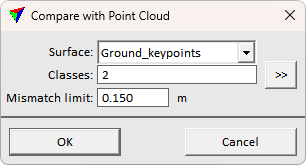
4. Define settings and click OK.
Setting |
Effect |
|---|---|
Surface |
The surface model to compare. |
Classes |
The point cloud class(es) to consider in the comparison. |
Mismatch limit |
Outlier filter threshold for reporting. Mismatches bigger than the threshold are not considered in reporting. |
This runs the comparison and opens the Compare Surface With Point Cloud text dialog for showing the comparison result:
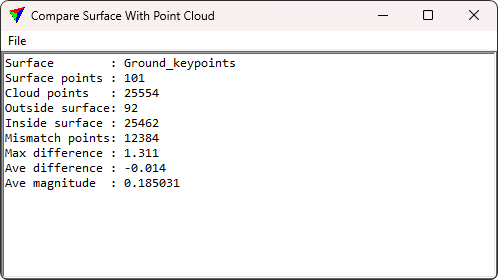
5. Evaluate the report or save the report using File > Save as text.