

TerraScan User Guide
Split by Gap
Split by gap command modifies existing point groups breaking separated groups. If existing grouping contains point groups with distance between group components longer than the defined gap, the tool separates the group parts creating new groups.
This tool can be useful for cleaning groups after manual group editing actions, or doing grouping with different settings or approach for more detailed, or higher point density area.
This tool requires grouped point cloud as input. Assign groups to points using Grouping Routines.
To split groups by gap:
1. Select Split Groups by Gap command from the Group pulldown menu.
This opens the Split Groups by Gap dialog:
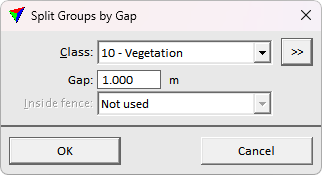
2. Define settings and click OK.
This assigns new group numbers for separated components of existing groups.
SETTING |
EFFECT |
|---|---|
Class |
Point class(es) to modify with the process. Groups in these classes are evaluated, and isolated components are split to separate groups. |
|
Opens the Select classes dialog which contains the list of active classes in TerraScan. You can select multiple source classes from the list that are then used in the Class field. |
Gap |
The gap distance between two group components making parts separated. |
Inside fence |
Determines how a fence or selected polygon(s) effect the classification: •Not used - fence or selected polygons are ignored. •One or more points - groups are classified if one or more points are inside. •Average xy - groups are classified if the average xy point is inside. •Majority of points - groups are classified if the majority of points is inside. •All points - groups are classified if all points are inside. |
