

TerraScan User Guide
Save points As
Save points As command writes points into a new file. The output file format can be any of the Supported file formats implemented in TerraScan or a user-defined point file format. See File formats / User point formats for more information.
To write points into a file:
1. Select Save points As command from the File pulldown menu.
This opens the Save points dialog:
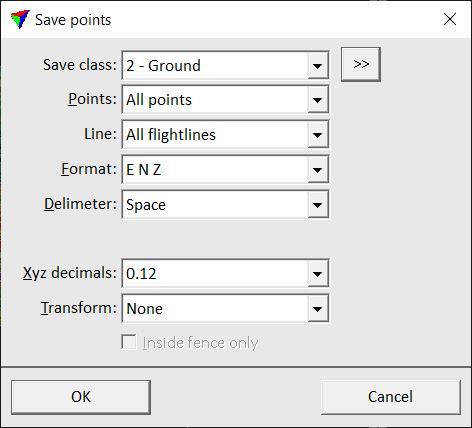
2. Define settings for the output file.
3. Click OK.
This opens the Save points dialog, a standard dialog for saving files.
4. Define a location and name for the output file and click Save.
This creates the output file.
SETTING |
EFFECT |
|---|---|
Save class |
Selection of classes that are written into the output file. Contains the list of active classes in TerraScan. Use the <Shift> or <Ctrl> keys to select several classes. |
|
Opens the Select classes dialog which contains the list of active classes in TerraScan. You can select multiple source classes from the list that are then used in the Save class field. |
Points |
Defines what points are written into the new file: •All points - all loaded points. This may include inactive points, for example from neighbour blocks or points extracted from waveform information. •Active block - points inside the active block area. This is active only if there are inactive points in memory. |
Line |
Line(s) that are written into the new file: points of All lines or points of the selected line number. |
|
Opens the Select lines dialog which contains the list of active lines in TerraScan. You can select multiple lines from the list that are then used in the Line field. |
Format |
Format of the output file. The list of formats includes all implemented file formats as well as any user-defined formats. |
Attributes |
Opens the Attributes to save dialog. Switch on attributes that you want to write into the output file. Only attributes that can be stored in the selected format are available. If specific attributes are required for the selected output format they are switched on by default. If color values are stored for the points, an additional selection of the amount of color channels is required. See more information here. |
Delimiter |
Defines the delimiter for text files: Space, Tabulator, or Comma. This is active only if some of the implemented text file formats are selected as Format. |
Surface |
Class(es) from which a surface is computed. This is active only if Format is set to E N Z dZ or if a user-defined format includes dZ, where dZ is the elevation difference between a point and the surface. |
Xyz decimals |
Defines the number of decimals for coordinate values. This is active only if an implemented text file format is selected as Format. |
Transform |
Transformation applied to points during the writing process. The list contains transformations that are defined in Coordinate transformations / Transformations category of TerraScan Settings. |
Inside fence only |
Only points that are inside a fence or a selected polygon are written into the output file. |
