

TerraScan User Guide
Fit to reference using trees
Fit to reference using trees command applies a systematic correction to a data set. The correction includes translation in XYZ direction and rotation around XYZ axes. The tool is suitable for georeferencing, not requiring any initial match between the active and the reference data.
The correction is computed based on reference points loaded into TerraScan. See Read reference points command for more information. The correction is applied to the active points loaded in TerraScan.
The tool requires the above ground points from the two scans as the input. Additionally, both the points to adjust and the reference must have distance attribute computed, representing the distance to the ground. Pre-process both the active and the reference data, for example, using classify ground, compute distances to the ground, and classify points by distance before loading the data for the fitting process.
The command is primarily developed for georeferencing ground based forestry data using aerial reference data, for example, georeferencing handheld scanner data or tripod mounted scanner data using UAV point cloud data. The method requires above ground points as input, groups tree objects in the point clouds, pairs the corresponding objects, and finds and applies the optimal transformation to match the two data sets. From the reference tree groups are identified by searching canopies. From the active data tree groups are identified by searching tree trunks. The fitting process is designed for effective georeferencing and alignment of the data to reference. For use cases requiring perfect alignment between the two data samples additional alignment tasks may be necessary.
To fit points to reference points using trees:
1. Prepare the points to adjust and the reference, separating the above ground points to use for the fitting process, and computing the point distances from ground.
2. Load points and reference points into TerraScan.
3. Select Fit to reference / Using trees command from the Tools pulldown menu.
This opens the Fit to Reference dialog:
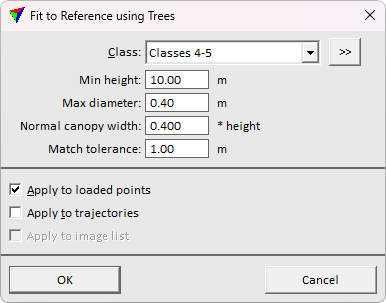
4. Define settings and click OK.
This fits the active points to the reference points.
SETTING |
EFFECT |
|---|---|
Class |
Class(es) used for computing the fit. |
|
Opens the Select classes dialog which contains the list of active classes in TerraScan. You can select multiple source classes from the list that are then used in the Class field. |
Min height |
Tree height required for fitting process. Lower trees are not used in the process. Use higher value to limit lower objects from the process. |
Max diameter |
The maximum trunk diameter allowed in the fitting process. Use to filter other objects than trees from the fitting process. |
Normal canopy width |
Expected canopy width relative to the tree height. |
Match tolerance |
Maximum residual offset allowed for trees to use in fitting. Use higher value if the tree shapes are more irregular, and the trunk is not often in the center relative to the canopy. For more symmetric trees use lower value to filter outlier pairings from the fitting process. |
Apply to loaded points/trajectories/image list. |
If on, the transformation is applied to loaded points/trajectories/image list. |
