

TerraScan User Guide
Group by tree logic
Not Lite
By tree logic grouping command assigns a group number to points representing a single tree.
This grouping method can be used, e.g., to identify points representing individual trees. Using the method together with Measure trunk diameters and/or Write group info, one could report tree parameters of a forest area, for example.
The group assignment relies on a distance from ground value and normal vector information. Both must be computed for the points before the command is started. Use Compute distance command for loaded points or Compute distance macro action with setting Compare to = Ground in order to compute the distance value. Use Compute normal vectors command for loaded points or Compute normal vectors macro action in order to compute normal vector directions.
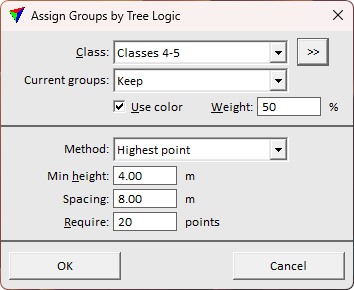
SETTING |
EFFECT |
|---|---|
Class |
Point class(es) included in the search for groups. |
|
Opens the Select classes dialog which contains the list of active classes in TerraScan. You can select multiple source classes from the list that are then used in the Class field. |
Current groups |
Determines how current group numbers of points are handled: •Clear - existing group numbers are deleted before assigning new numbers resetting the old grouping. •Keep - existing group numbers are kept continuing the previous grouping. |
Use color |
If on, color values assigned to the points are used for grouping. The Weight of color values is determined by the given percentage value. |
Method |
Method of grouping trees: •Highest point - based on top-down approach identifying local highest points as tree tops, and identifying the connected points below to the same group. This is suitable for airborne point clouds. Thin high density point clouds before using this method for better processing time and result accuracy. •Clean trunk - based on tree trunks visible in the point cloud. This requires a high amount of points from trunks and is suitable for mobile data, point clouds from static scanners, and very high-density airborne point clouds. This method requires points penetrating to the trunk surface. •Circular trunk - based on tree trunks visible in the point cloud. This requires a high amount of points from trunks and is suitable for mobile data, point clouds from static scanners, and very high-density airborne point clouds. This method allows some branches or other obstacles covering the scanner visibility to the trunk. •Vertical trunk - based on tree trunks visible in the point cloud. This requires a high amount of points from trunks and is suitable for mobile data, point clouds from static scanners, and high-density airborne point clouds. This method tolerates branches better than Clean or Circular trunk options, but does not handle leaning trees. |
Min height |
Minimum height above ground of a group. |
Spacing |
Expected minimum spacing between single trees. Use higher value to filter false findings. This is active only if Method is set to Highest point. |
Require |
Minimum number of points that form a single tree group. This is active only if Method is set to Highest point. |
Max diameter |
Maximum diameter of a tree trunk as an approximate estimate. This is active only if Method is set to Clean trunk or Circular trunk. |
Min trunk |
Minimum length of the tree trunk. This is active only if Method is set to Clean trunk or Circular trunk. |
