

TerraScan User Guide
Import E57
 Import E57 tool extracts, and reads in data stored in E57 format. E57 is a file format for storing point cloud, and image data in one package.
The tool performs following actions:
•Reads points from E57 format files to memory.
•Extracts scan positions from E57 format files to TRJ format.
•Extracts image data from E57 format files and stores the images as JPG files.
•Extracts image orientations and camera calibration data from E57 format files and stores TerraPhoto image list, camera calibration and mission files.
•Loads the created TerraPhoto files as the active TerraPhoto project.
To import E57:
1. Select the Import E57 tool.
This opens the standard file selection dialog. Select the E57 file(s) to import.
This opens the Import E57 dialog:
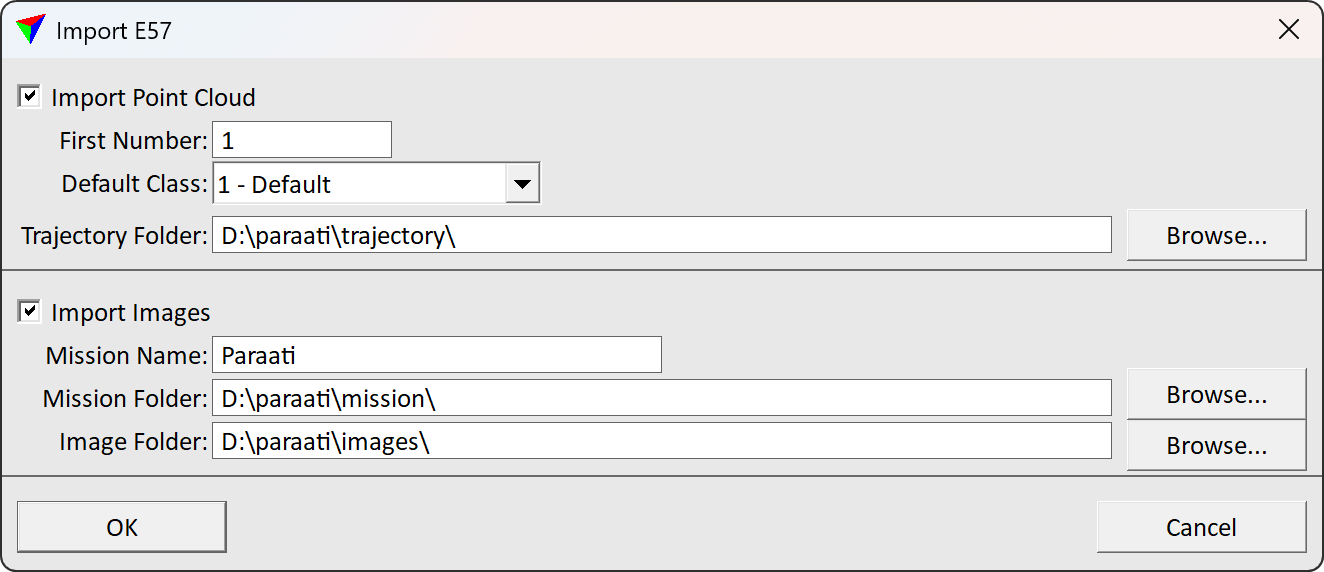
2. Define the settings and click OK.
This starts the import process. TerraScan loads and extracts selected data from E57 files to memory, and selected directories.
SETTING |
EFFECT |
|---|---|
Import point cloud |
If on, points from the selected file(s) are read to memory as loaded points, and trajectories/scan positions are read from E57 to TRJ format. |
First number |
The first line number to use enumerating the imported data. |
Default class |
The point class to assign to all points with no classification. |
Trajectory folder |
The directory for storing trajectory, or scan position data. The import process creates the TRJ format files to this directory. |
Import images |
If on, import process extracts pictures, and image orientation data from E57 to JPG, TerraPhoto MIS, IML and CAL formats and loads the mission to TerraPhoto. |
Mission name |
The TerraPhoto mission name to apply in mission metadata and file naming. |
Mission folder |
The folder for storing TerraPhoto MIS, IML and CAL files. |
Image folder |
The folder for storing JPG image files. |