

TerraScan User Guide
Tools / Join arcs with similar radii
Join arcs with similar radii command joins pairwise neighbouring circular arcs with similar radii into a single circular arc. It is applied to all circular arc components.
To join arcs with similar radii automatically:
1. Select the Join arcs with similar radii command from the Tools pulldown menu.
This opens the Join arcs with similar radii dialog:
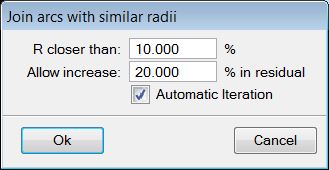
2. Define settings and click OK.
This starts the process.
SETTING |
EFFECT |
|---|---|
R closer than |
Defines the maximum relative difference in radius values that is allowed between of two arcs to be joined. |
Allow increase |
Determines the maximum allowed increase in residual values caused by joining two arcs. |
Automatic iteration |
Usually, the command needs to run more than once in order to join all components with similar radii. If this option is on, the iteration is continued automatically until no more arcs can be changed. |
Key-in: road arcs join