

TerraScan User Guide
Tools / Fix to even radius
Fix to even radius command is used in the last stage of the geometry production workflow. It quickly changes the radii of all or the selected circular arcs to the closest even meter, five meter, or any other radius value.
To fix radii to even values automatically:
1. (Optional) Select circular arc components in the main window of the application.
2. Select the Fix to even radius command from the Tools pulldown menu.
This opens the Fix to even radius dialog:
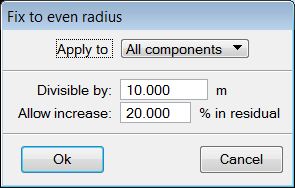
3. Define settings and click OK.
This starts the process.
SETTING |
EFFECT |
|---|---|
Apply to |
Defines to which components the process is applied: All components or Selected components. |
Divisible by |
Defines the common factor for all radii. |
Allow increase |
Determines the maximum allowed increase in residual values caused by fixing radius values of arcs. |
Key-in: road arcs even