

TerraScan User Guide
Model keypoints
Model keypoints routine classifies relevant points for creating triangulated surface models. The routine selects relevant points to make the triangulation more light. The selected points ensure specified level of detail in the model, allowing set tolerance as maximum difference between the surface represented in the original points compared to the classified set of keypoints. For LAS 1.4 files, you can set the keypoint bit instead of classifying the points.
The routine tries to find a relatively small set of points (= keypoints) which create a triangulated model of the given accuracy. It starts by classifying all points from the source class, which is usually the ground class, into the target class. Then, it iteratively removes all points from the target class that are not required in a surface model of the given accuracy.

Model keypoints (red points) as subset of ground points (black points).
You control the accuracy of the keypoint model with elevation tolerance settings Above and Below model. These settings determine the maximum allowed elevation difference between the keypoint model and a surface model created from the original ground points. The Use points every setting ensures a minimum point density in the final model. For example, if the distance between a point and its closest neighbour must not be less than 10 meter, you should set the Use points every setting to 10.0 m.
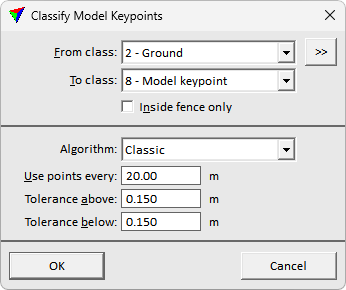
SETTING |
EFFECT |
|---|---|
From class |
Source class(es). Contains usually ground points. |
|
Opens the Select classes dialog which contains the list of active classes in TerraScan. You can select multiple source classes from the list that are then used in the From class field. |
To class |
Target class. For LAS 1.4 files, you can choose Set keypoint bit as alternative. |
Inside fence only |
If on, points inside a fence or selected polygon(s) are classified. |
Algorithm |
The approach for selecting the keypoints: •Classic - efficient approach finding relevant points based on difference if the point is removed. •Break+mass - heavier approach additionally prioritizing points on relevant breakline features, and mitigating noise in flat areas. Aims on producing cleaner result with slightly increased computation need. |
Use points every |
Minimum point density of model keypoints. In areas of completely flat ground, there is a keypoint at approximately the given distance. |
Tolerance above |
Maximum allowed elevation difference upward between the triangulated keypoint model and a model of the original source points. |
Tolerance below |
Maximum allowed elevation difference downward between the triangulated keypoint model and a model of the original source points. |
