

TerraScan User Guide
Linear Features
Linear features routine classifies points from fences, or other similar features forming a continuous linear chain.
The point cloud should have distance to ground calculated in Distance attribute field using compute distance -routine before executing this tool.
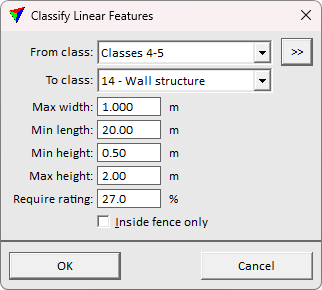
SETTING |
EFFECT |
|---|---|
From class |
Source class(es). The source classes must contain the water surface and the bottom. |
|
Opens the Select classes dialog which contains the list of active classes in TerraScan. You can select multiple source classes from the list that are then used in the From class field. |
To class |
Target class. |
Max width |
Maximum horizontal width allowed for each linear feature. |
Min length |
Minimum continuous length required for each linear feature. |
Min height |
Minimum height required for each linear feature. This option validates the features checking the point Distance attribute values. |
Max height |
Maximum height allowed for each linear feature. This option validates the features checking the point Distance attribute values. |
Require rating |
Classification sensitivity. Use higher value for more strict classification tolerance. |
Inside fence only |
If on, only points inside a fence or selected polygon(s) are classified. |
