

TerraScan User Guide
Copy from reference
Not Lite
Copy from reference command copies point attributes from reference points to the active points loaded in memory. See Read reference points for more information about loading a reference point cloud.
There has to be a possibility to uniquely identify a point by its attributes in the active and reference project binary files in order to ensure that the correct attributes are copied for a point.
For LAS files, the combination of time stamp + echo information is unique for each laser point if all the data was captured in one GPS week or if GPS standard time stamps are used. Otherwise, the combination of line + time stamp + echo information defines a laser point unambiguously.
For TerraScan Binary and FastBinary files, the combination of time stamp + echo information is not unique for each laser point because of the resolution with which time stamps are stored in this format. Therefore, additional attributes that are the same in the active and reference project binary files have to be selected to identify laser points unambiguously.
An example case for using this command could be:
•Laser data has been imported into a project in folder \laser1.
•Heading, Roll, Pitch (HRP) misalignment has been solved and applied to the laser points that are now stored in folder \laser2.
•Automatic and manual classification steps have been performed.
•After the classification it has been realized that the HRP correction was wrong but the classification is good and took a lot effort.
•As a solution, the project in folder \laser1 is defined as reference project in the information dialog of the project in folder \laser2.
•The attributes xy and z are copied from laser data in \laser1 to the data in \laser2 using the Copy from reference command.
This restores the coordinate values from the status before the HRP correction but preserves the classification that was done after the HRP correction.
To copy attributes from a reference project:
1. Select Copy from reference command from the Tools pulldown menu.
This opens the Copy from Reference dialog:
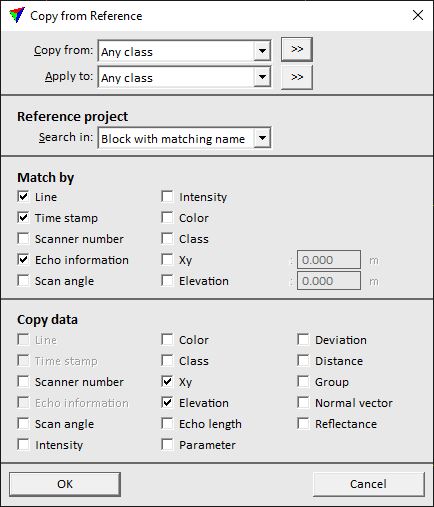
2. Define settings and click OK.
This copies the selected attributes to the from the reference points to the loaded points.
After the process finished, a report is displayed that shows the number of points changed. To store the changes, save the points.
SETTING |
EFFECT |
|---|---|
Copy from |
Point class(es) from which the attributes are copied. |
|
Opens the Select classes dialog which contains the list of active classes in TerraScan. You can select multiple source classes from the list that are then used in the Copy from field. |
Apply to |
Point class(es) to which the attributes are copied. |
|
Opens the Select classes dialog which contains the list of active classes in TerraScan. You can select multiple source classes from the list that are then used in the Apply to field. |
Match by |
If on, the attribute is used to find matching points in the reference and active projects. |
Copy data |
If on, the attribute is copied from the laser points in the reference project to the corresponding laser points in the active project. |
