
TerraPhoto User Guide
Set View Size
 Set View Size tool sets the CAD viewport size in pixels.
The tool is useful for rendering images and flythru animations from the view contents. Defining the resolution accurately ensures desired resolution and image ratio.
To set the CAD view size:
1. Select Set View Size tool.
This opens the Set View Size dialog:
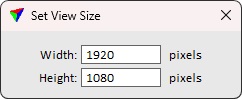
2. Define resolution settings and click inside a view.
This adjusts the view to the defined size.