

TerraPhoto User Guide
Import Pictometry survey
Not UAV
Import Pictometry survey command reads information from a text file and creates a mission file, an image list, and camera files. The text file can be created, for example, from the .DBF file delivered by the Pictometry system software.
The text file must include a specific set of columns which are delimited by tabulator. The two options for columns and their labels are:
•NAME, OMEGA, PHI, KAPPA, X COORD, Y COORD, ALTITUDE, X PP OFFSET, Y PP OFFSET, FOCAL LENGTH, FOCAL WIDTH, FOCAL HEIGHT, K1, K2, K3, GPS TIME
•IMAGENAME, IMAGEEXT, OMEGA, PHI, KAPPA, CAMERAX, CAMERAY, ALT, PPX, PPY, FOCALLEN, IMAGECOLS, IMAGEROWS, K1, K2, K3
The text file must have the extension .CSV. The camera parameters for each camera of the system are converted into a TerraPhoto camera calibration file. The time and positional information for the images are converted into a TerraPhoto image list.
To import a Pictometry survey index file:
1. Select Import Pictometry survey command from the Mission pulldown menu.
This opens the Import Pictometry survey dialog, a standard dialog for opening files.
2. Select the text file and click Open.
The Import Pictometry Survey dialog opens:
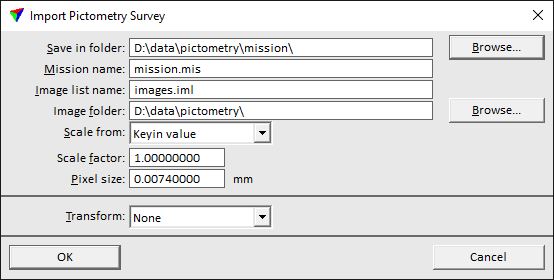
3. Define settings and click OK.
The mission file, an image list file, and camera calibration files are created in the given directory.
SETTING |
EFFECT |
|---|---|
Save in folder |
Directory that stores the mission file, the image list file, and the camera files. |
Mission name |
File name of the mission file. The extension must be .mis. |
Image list name |
File name of the image list file. The extension must be .iml. |
Image folder |
Directory that stores the image files. |
Scale from |
Method of deriving the scale factor: •Keyin value - the scale factor is defined by the given value in the Scale factor field. •<projection system> - the scale factor is defined by the selected projection system. You can choose from any of the builtin or user-defined projections systems which are set as active in TerraPhoto Settings. |
Pixel size |
Pixel size of the raw images in millimeter. |
Transform |
User-defined transformation that is applied to the image list. The list contains transformations defined in Coordinate transformations / Transformations of TerraPhoto Settings. |