

TerraScan User Guide
Tools / Remove arcs with large radius
Remove arcs with large radius command offers a fast way to change circular arcs with large radii to lines.
To remove arcs with large radii automatically:
1. (Optional) Select circular arc components in the main window of the application.
2. Select the Remove arcs with large radius command from the Tools pulldown menu.
This opens the Remove arcs with large radius dialog:
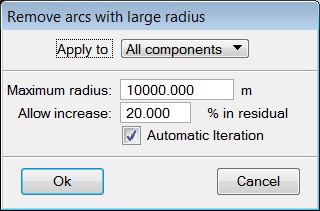
3. Define settings and click OK.
This starts the process.
SETTING |
EFFECT |
|---|---|
Apply to |
Defines to which components the process is applied: All components or Selected components. |
Maximum radius |
Maximum allowed radius of arcs. If the radius of an arc is larger, the application tries to convert the arc into a line. |
Allow increase |
Determines the maximum allowed increase in residual values caused by converting arcs into lines. |
Automatic iteration |
Usually, the command needs to run more than once in order to get rid of large radius components. If this option is on, the iteration is continued automatically until no more arcs can be changed. However, this can cause the residuals to accumulate. |
Key-in: road arcs max