TerraModeler User Guide
Find Stockpile Boundaries
 Find stockpile boundaries tool creates outline polygons bounding stockpiles in point cloud data. The tool identifies stockpile boundaries finding the terrain change on the bottom of stockpile.
This tool requires point cloud loaded in TerraScan, and stockpiling area extent polygon(s) selected. Each extent polygon may limit several stockpiles. Extent polygon boundary should run along relatively flat ground.
This tool requires TerraScan running and point cloud loaded. Additionally, requires CAD element(s) defining the area(s) of interest for the automatic search.
To create stockpile boundaries:
1. Select polygon(s) outlining the stockpiling area(s).
2. Select the Find stockpile boundaries tool.
This opens the Find Stockpile Boundaries dialog:
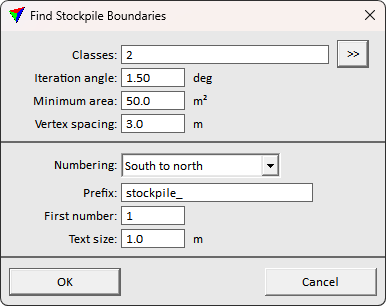
3. Define settings and click OK.
The boundary recognition process starts. The application draws the result boundaries to the CAD file using the active drawing settings.
Setting |
Effect |
|---|---|
Classes |
The point class(es) to use in recognition. The points should represent the stockpiles and ground in the stockpiling area. Use >> button to select multiple classes. |
Iteration angle |
The threshold for finding stockpiles. Lower value allows more mild or smooth transition, while higher value can produce cleaner result. |
Minimum area |
Minimum stockpile area. Smaller findings are neglected. |
Vertex spacing |
The target boundary element vertex spacing. Bigger spacing creates more generalized results, while unnecessarily small spacing creates noisy result. |
Numbering |
Stockpile labeling order. Software can order labels based on coordinate axis direction or coverage area size. None creates no labels. |
Prefix |
Prefix text to use for labels. |
First number |
Number of the first stockpile label. |
Text size |
Font size for stockpile labels. |