

Terra License Server/Manager User Guide
Run Terra License Server
Terra License Server needs to be running whenever client computers want to request or return licenses.
A better alternative is to install Terra License Service together with the License Server. The service runs as Windows service which is started automatically after installation and when the computer is rebooted. In this case, the Terra License Server application acts as user interface for viewing the status of the network licenses or for changing server settings.
The application window shows the current state of the network licenses and logs every license request and return event.
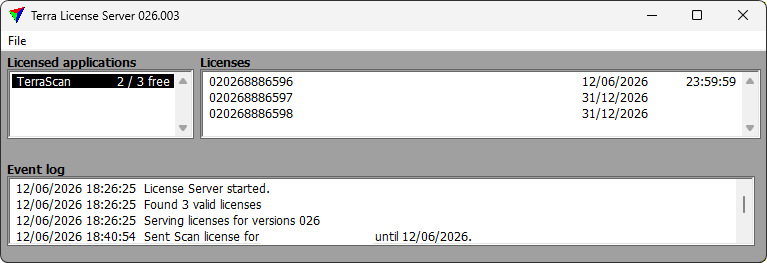
Licensed applications list shows a list of applications for which there are valid license files in the License Server installation folder, usually C:/TERRA64/POOL0XX where XX stands for the current version number.
Licenses list shows the status of each license for the application selected in Licensed applications list. This includes the license number, the name of the client computer that uses the license and the return date for the license.
Event log shows all the events since the program was last started. This includes information about licenses, for example issues arising from bad licenses (invalid license files, different major version licenses in the same folder, etc.). The events are also written into a text file named LICENSE_SERVER_LOG.TXT which is stored in the License Server installation folder, usually C:/TERRA64/POOL0XX where XX stands for the current version number. The text file contains all events since the License Server installation.
The Terra License Server Settings can be opened from the File pulldown menu.