

Terra License Server/Manager User Guide
Enter License Server Settings
The License Server settings specify an access code for the server/manager communication, the maximum duration for which licenses can be checked out on client computers and a time interval for closing and reopening the communication pipe.
To enter server settings:
1. Start Terra License Server application.
2. Select Settings command from File pulldown menu.
This opens the Settings dialog:
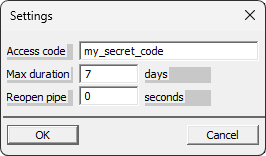
6. Specify settings and click OK.
This saves the settings into a configuration file named LICENSE_SERVER.UPF and stored in the same folder as the License Server application.
SETTING |
EFFECT |
|---|---|
Access code |
A password to prevent unintended usage of licenses. All client computers must use exactly the same access code defined on the server. |
Max duration |
Longest loan period of licenses allowed by the server. License manager can request longer duration, but the server will not response with licenses longer than set duration. Short period is advised to prevent broken client computers reserving licenses. No tool exists to recover licenses from a broken machine. If a computer with borrowed licenses breaks down, the licenses will become available as soon as the validity period ends. |
Reopen pipe |
Time interval the connection endpoint in the license server computer is reopened. Depending on the server setup, background processes may be cut periodically for power optimization or software security closing the connection endpoint. In this case, the connection must be initialized again to allow requests from the client computers. If set to zero, connection endpoint is initialized only on start up. |
Licenses are returned to the server automatically after the check-out period ends or manually by the License Manager on the client computer. If a client computer breaks down or if the licenses can not be returned for another reason from the client computer, the licenses are blocked until the check-out period ends. There is no way of forcing the return of licenses in the server application. Therefore, it is strongly recommended to limit the maximum duration for the license check-out to a reasonable amount of days.