

Terra License Server/Manager User Guide
Enter License Manager Settings
The License Manager settings specify an access code for the server/manager communication and the name of the computer acting as License Server for Terrasolid applications.
To enter manager settings:
1. Start Terra License Manager application.
2. Select Settings command from File pulldown menu.
This opens the Settings dialog:
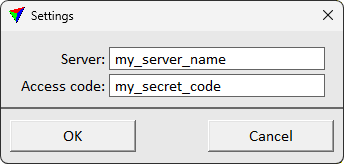
3. Enter the name of the computer acting as License Server.
4. Specify the Access code. The code must match exactly the access code defined in the License Server settings.
5. Click OK.
This saves the settings into a configuration file named LICENSE_MANAGER.UPF and stored in the same folder as the License Manager application.