

TerraBatch User Guide
Installation
The steps for the installation of TerraBatch depend whether it is installed on a master computer or on a batch computer. Basically, on a master computer TerraBatch is installed together with other Terra applications and no separate setup is required. On a Batch computer, TerraBatch is installed as only application with its own setup.
Master computer setup
Run normal TerraScan/TerraPhoto/TerraMatch setup as described in the corresponding User Guides.
The Terra Setup dialog below shows the setup of TerraScan on top of Spatix as example:
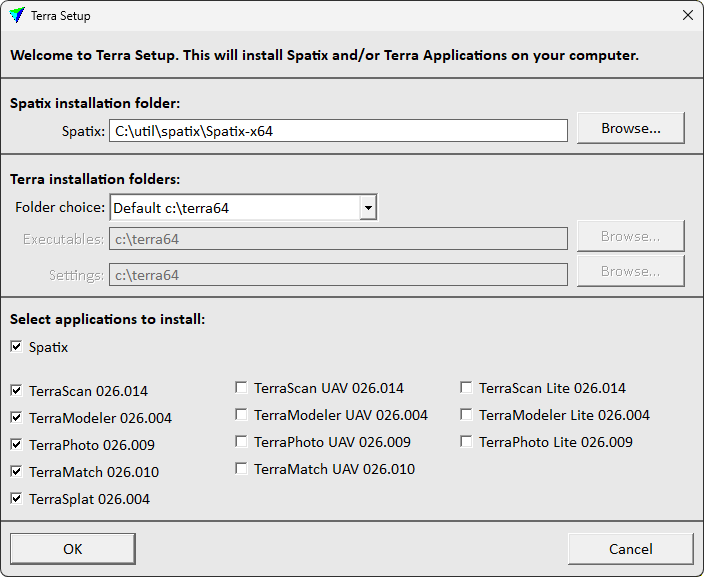
This installs TerraDispatcher and TerraBatch as part of the TerraScan setup.
There is no need to separately install TerraBatch unless you want to use the same computer as a batch computer (=run tasks initiated from other computers).
Batch computer setup
Run TerraBatch setup on all computers which will act as a batch computer for processing tasks.
To install TerraBatch on a batch computer:
1. Start setup.exe in the installation package with administrator permissions.
This opens the TerraBatch dialog:
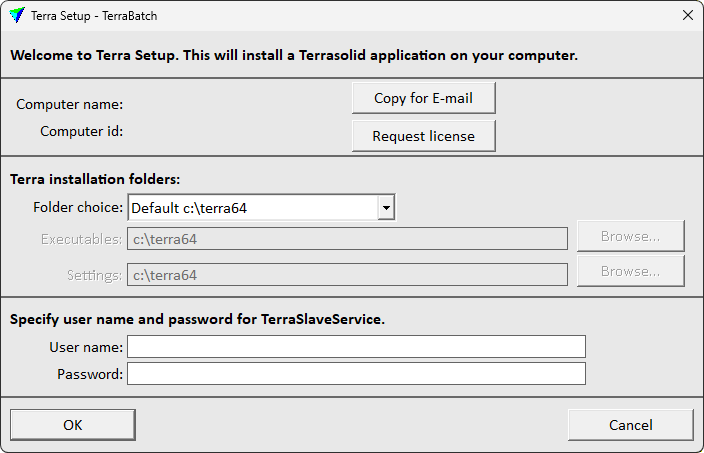
2. Define the installation folder(s) where to install TerraBatch. The same installation folder must be used for all Terra applications.
The default Folder choice is Default c:\terra64. This installs all executables and setting files into the same folder c:\terra64. The folder is created automatically, if it does not exist.
As an alternative, if executables and settings files need to be separated, select another Folder choice:
•Default 'Program files' - executables are installed into c:\program files\Terrasolid, setting files are installed into C:\TERRA64.
•Freely selectable folders - the user defines a folder for Executables and Settings in the corresponding input fields. Click on the Browse button next to each input field in order to select a folder.
3. Type a User name and Password in the text fields. TerraBatchService needs user name and password for an account which has the appropriate read/write access to shared folders on the master and batch computers.
4. Click OK.
This installs TerraBatch and TerraBatchService on the batch computer. When the installation is finished, a message is displayed.
The single TerraBatch setup contains a PDF with general information about TerraBatch. The PDF is stored in the \TERRA64\DOCS folder of your Terra application installation folder.