Delete by line
Not Lite
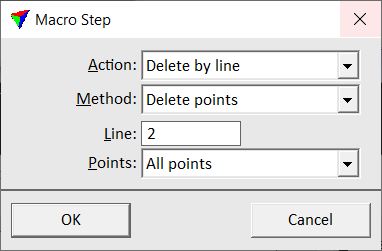
Delete by line action performs about the same process as the By line option of the Delete command. The action deletes points from the block binary files. You can define a certain line number and specify the area from which to delete points.
For LAS 1.4 files, you can specify that the withheld bit is set instead of deleting points.
SETTING |
EFFECT |
|---|---|
Method |
Defines what method is applied to points: •Delete points - deletes the point. This is the normal method to remove points from a file. •Set withheld bit - sets the withheld bit for points in LAS 1.4 files. The point itself is kept in the file. |
Line |
Line number of points to be deleted. A number between 0 and 65535. |
Points |
Specifies the area for which to delete points: •All points - all points are deleted. •Inside fence only - all points inside a MicroStation fence or selected polygons are deleted. •Outside fence only - all points outside a MicroStation fence or selected polygons are deleted. |
Return value: Number of points that were effected by the process or -1 if the process failed due to missing fence information.