

TerraScan User Guide
Tools / Residual display
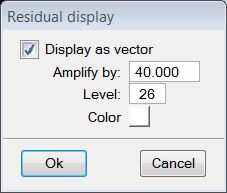
Residual display command shows an exaggerated residual vector for the active geometry. The settings for drawing residual vector into the CAD file are defined in the Residual display dialog:
SETTING |
EFFECT |
|---|---|
Display as vector |
If on, the residual vector is displayed in the CAD file. Switch this off if you want to remove the display of the residual vector. |
Amplify by |
Scaling factor of the residual vector. |
Level |
Level on which the residual vector is drawn. Refers to a CAD level number. |
Color |
Color of the residual vector. Uses the active color table of MicroStation. |
You can also remove the display of a residual vector by using File / Close all command.