

TerraScan User Guide
Component / Change selected
The operation of Change selected command depends on the type of the selected components.
Key-in: road change components
Change into a line
The application tries to change the components into a line if
•the selection is a circular arc or a set of circular arcs that belong to a set of curved components with continuous tangent.
•the selection includes a line.
In this case, the change is attempted automatically and you have only the option of accepting or rejecting it.
Change into a circular arc
The application tries to change the components into a circular arc if
•the selection is part of a set of curved components with continuous curvature
In this case, the command opens the Road change component dialog:
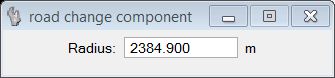
The Radius value shown in the dialog is an estimate made by the application. The sign of the radius is also determined automatically. You may set the new radius of the circular arc to a specific value by typing the value into the Radius field. Changing curved components into a line can be attempted by setting the radius to 0.00 in the Road change component dialog.
The change is attempted and if a solution is found, a preview of the modified component(s) is shown in the CAD view. If you accept the modification by a data click, the component list is updated.
Small radius values are more likely to produce an acceptable solution.