

Terra License Server/Manager User Guide
Installation
You should carefully consider to which computer to install the Terra License Server. The network licenses that you get from Terrasolid will only work on that specific computer. You should therefore install Terra License Server on a computer which you plan to use for a long time.
After the installation, you must configure the Terra License Server/Manager.
To install Terra License Server or Terra License Manager:
1. Start setup.exe in the installation package with administrator permissions.
This opens the Terra Setup dialog:
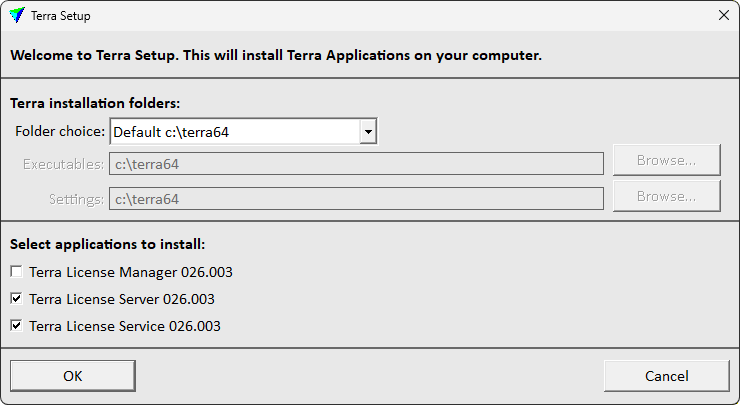
2. Define the installation folder(s) where to install Terra License Server/Manager. The same installation folder must be used for all Terrasolid applications.
The default Folder choice is Default c:\terra64. This installs all executables and setting files into the same folder c:\terra64. The folder is created automatically, if it does not exist.
As an alternative, if executables and settings files need to be separated, select another Folder choice:
•Default 'Program files' - executables are installed into c:\program files\Terrasolid, setting files are installed into C:\TERRA64.
•Freely selectable folders - the user defines a folder for Executables and Settings in the corresponding input fields. Click on the Browse button next to each input field in order to select a folder.
3. Select Terra License Manager, Terra License Server and/or Terra License Service to install.
Terra License Server and optionally the Service must be installed on the computer that acts as license server for Terrasolid licenses. The installation of the Service is optional but highly recommended.
Terra License Manager must be installed on any computer on which you want to run the licensed Terrasolid applications, such as TerraScan, TerraMatch, TerraPhoto, TerraModeler, etc..
One computer can act as license server and run the Terrasolid applications at the same time.
4. Click OK.
When the installation is finished, a message is displayed.
The Terra License Server and Service executables are located in the folder defined above for executables, e.g. by default in C:\TERRA64\POOL0XX where XX stands for the current version number.
The Terra License Manager executable is located in the folder defined above for executables, e.g. by default in C:\TERRA64\LICENSE.
Server information must be sent to Terrasolid when a new computer is taken into use as license server for Terrasolid applications. This may be the case if you become a new customer of Terrasolid or if you need to move your licenses from one to another server computer. Please note that Terrasolid does not accept frequent moves of licenses.